
Key Takeaways
- Playa Bikes are rolling into BurnerSphere. When you spot one, click it and ride. Anyone can hop on.
- Hosts can add speakers by name, on the Events Kiosk or on the website, and speakers can now run the Show Board.
- Busy events run smoother: no more invisible avatars or “Missing Name” tags.
- Camp Mates can remove several gallery photos at once and make a photo 3D after uploading it.
- BurnerSphere for iPad is in beta testing, and the beta now lets you build in Toolkit worlds by touch and ride Playa Bikes. Come help us test it.
No headset needed: BurnerSphere is a social VR immersive documentary platform and an official virtual Burning Man experience, created in collaboration with Burning Man Project. Explore on Mac or PC, or go fully immersive on Meta Quest or PC VR.
What is the playa without a bike? Here is everything new since v81. v82 is live now on Meta Quest, Steam, the Mac App Store, and the Microsoft Store, and in beta on iPad.
Playa Bikes
Our admins are placing Playa Bikes in worlds around BurnerSphere, and anyone can ride one. You will find a bike or two in Center Camp right now, and more will turn up in other worlds as our admins leave them for you to find. Find a bike, click it, and you are on.
“What is the playa without a bike?” says Doug Jacobson, BurnerSphere co-founder; Producer, Director, and CTO. “Hop on, ring your bell, and go find your friends.”
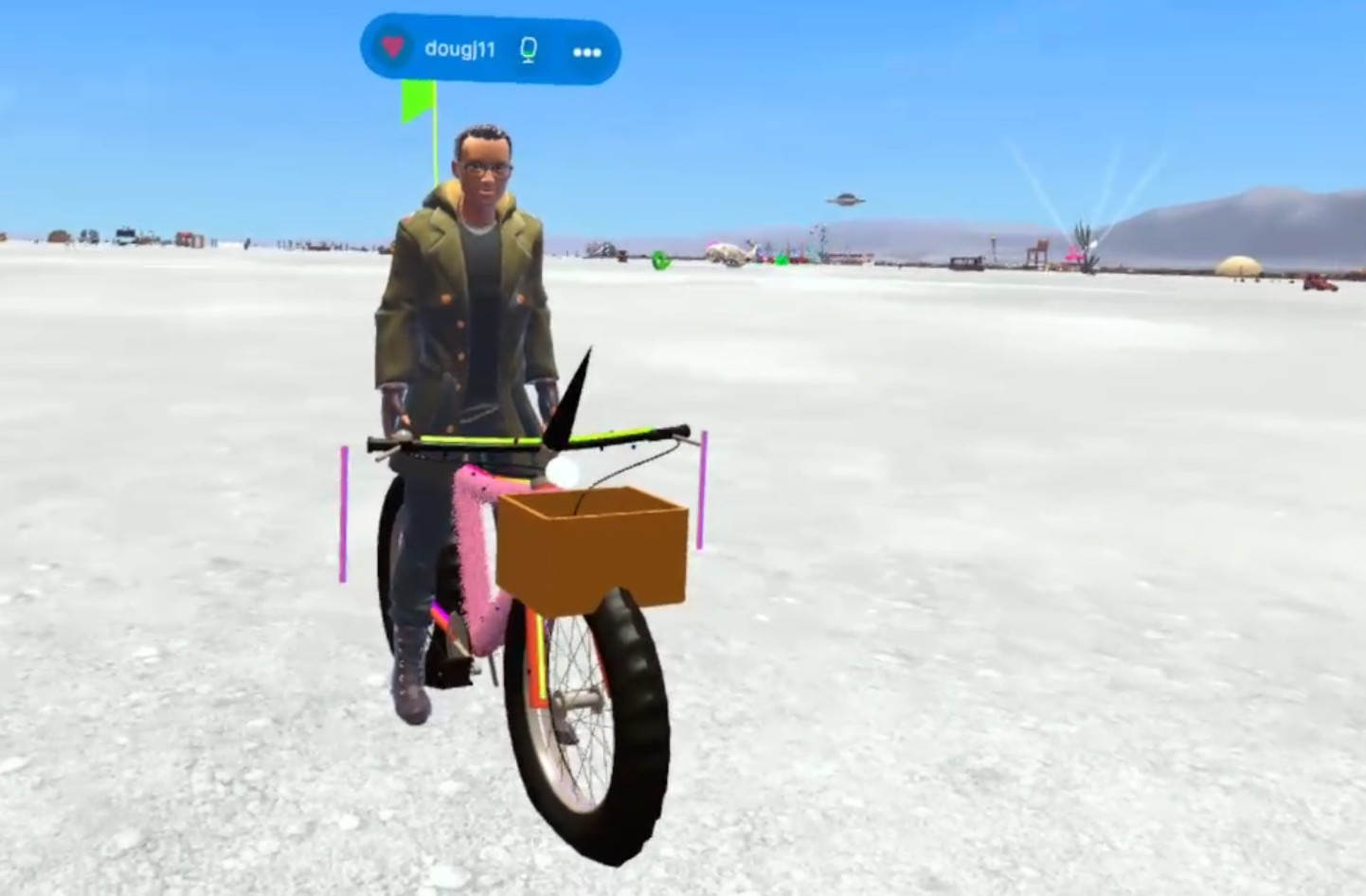
How to ride
- Get on: click the bike.
- Ride and steer: use W, A, S, and D on a computer, or your navigation controller in VR.
- Brake: pull the thumbstick back, like pedaling backwards on a coaster bike.
- Ring the bell: once you are on the bike, click the bell.
- Get off: click the ground away from the bike.
Bikes stay in the world where you find them. They don’t travel through portals, so when you are ready to explore another world, hop off and step through on foot.
The bikes are beautifully detailed, with bent tubes, laced spokes, tires, and a chain, plus fur, sequin, and LED looks and recorded bells.
New tools for hosts
“A great event needs great speakers,” Doug says. “Now hosts can add them by name and hand them the Show Board.”
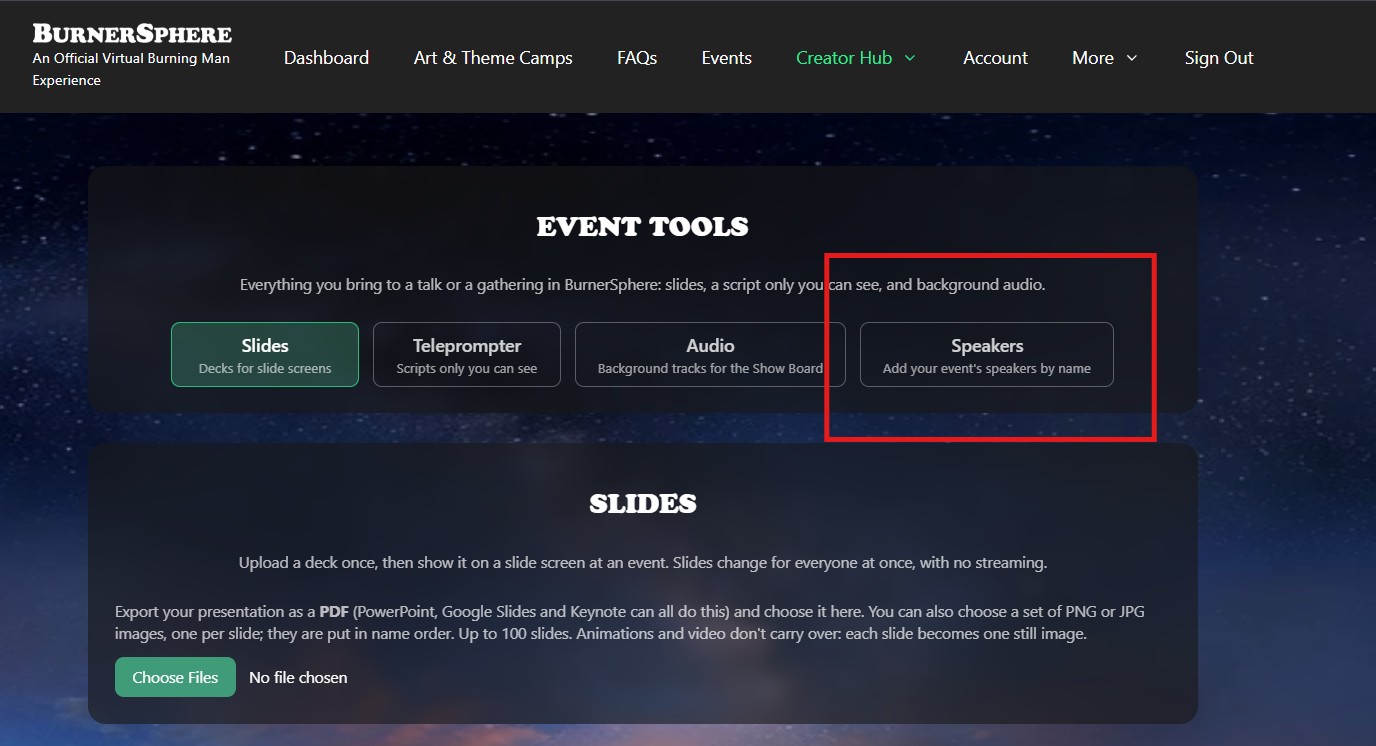
- Add speakers by name: on the Events Kiosk, tap Find by name and type with the in-world keyboard. Or add them before the event on the Speakers tab of the Event Tools page.
- Speakers can run the Show Board: anyone on the world’s Events Kiosk speaker list can now use it.
- Make presenter: Present is now a clear button, Make presenter, which changes to Presenting (stop).
- People list: the kiosk’s People list shows six people at a time, with pages.
- Breakout Zones: walking through a zone no longer switches your voice. Stay in it for half a second to join.
- Stages and zones: new ones no longer spawn on top of each other, and dragging one with the mouse keeps it on the ground instead of making it vanish.
New to hosting? Start with our guide to hosting your own event.
Photo Gallery upgrades
Camp Mates can build their own photo galleries from the Creator Hub on your BurnerSphere dashboard. Now you can remove several photos at once, and make a photo 3D after you upload it, in Regular, Stereo parallel, or Stereo cross-eyed. Headsets pick up the new version.
Official Burning Man photographers can request a gallery of their own, which we add to the Media Mecca tab in the World Selector. They don’t need to be Camp Mates to have a gallery.
The iPad beta
BurnerSphere for iPad is in beta testing, and a huge thank you to all our early testers for playing, exploring, and telling us what to fix. Want to help? Download BurnerSphere from the App Store on an iPad with an A14 chip or newer, or an M-series chip. For the smoothest start, set up your account in your iPad’s browser first, and the app connects to it automatically when you open it. Then tell us what you find on the BurnerSphere Discord.
New in the iPad beta with v82:
- Build by touch: in Toolkit worlds, drag items along the ground, with buttons to turn, raise and lower, resize, lock, delete, and place them.
- Ride Playa Bikes: the move control stays on screen, and the Use button rings the bell.
- Coloring Book World: the coloring palette no longer covers the move control.
Bug Fixes You’ll Notice
- Invisible avatars: in busy worlds, two people wearing the same avatar could make one of them invisible. Fixed.
- Missing names: players without a name showed “Missing Name.” They now show their username, or “Burner.”
- Event teleporters: walking into an event teleporter with no event behind it no longer tries to load a world and fails.
We checked the avatar and name fixes at a 24-person event, and everyone showed up right. If you run into a bug, please report it on the BurnerSphere Discord.
Frequently Asked Questions
Who can ride a Playa Bike?
Anyone. When you find a bike in a world, click it to get on.
Where can I find a Playa Bike?
There is a bike or two in Center Camp right now. More will turn up in other worlds as our admins leave them for you to find.
Can I try BurnerSphere on my iPad?
Yes. BurnerSphere for iPad is in beta testing, and we would love your feedback. You need an iPad with an A14 chip or newer, or an M-series chip. Share what you find on the BurnerSphere Discord.
How do I ride a bike on a computer?
Click the bike to get on. Use W, A, S, and D to ride and steer, click the bell to ring it, and click the ground away from the bike to get off.
Can I take a bike to another world?
No. Bikes stay in the world where you find them and don’t travel through portals.
How do I add a speaker to my event?
Tap Find by name on the Events Kiosk, or use the Speakers tab on the Event Tools page.
Where do I make a photo gallery?
Camp Mates make galleries from the Creator Hub on their BurnerSphere dashboard. Official Burning Man photographers can request a gallery on the Media Mecca tab without being Camp Mates.
Ride on
Find a bike, ring your bell, and roll across the playa with your friends. Create your free account, download BurnerSphere for your device, and learn about Camp Mate membership when you are ready to dive deeper. Come take a stroll in the digital dust.