
Key Takeaways
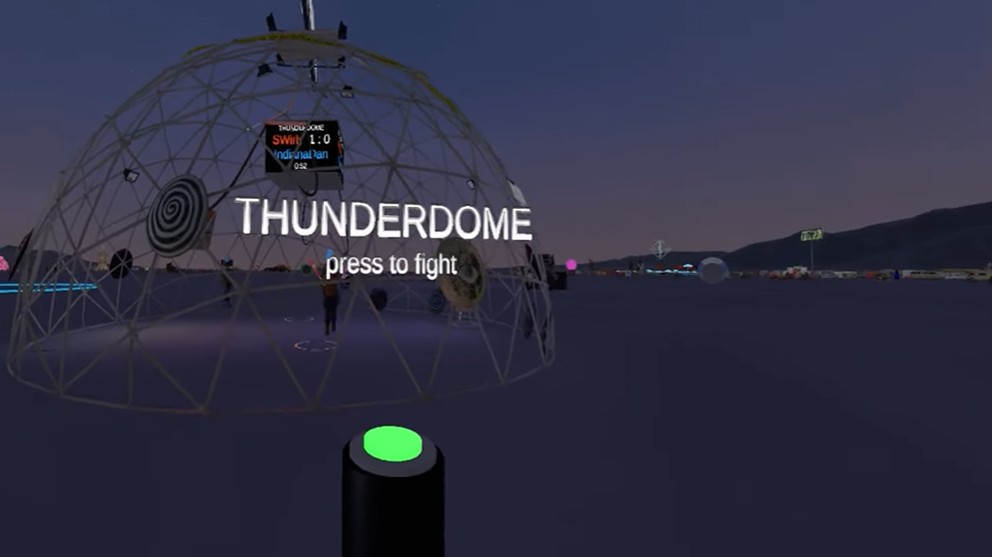
- The Thunderdome is a real game now: get in line, grab a foam bat, and bonk your way to five.
- Fun toys are popping up around BurnerSphere, from fire poi to a handpan to a bubble gun, and Camp Mates can keep some in their backpack.
- Six emoji reactions pop up over your head for everyone around you to see.
- For events: the Intention Pond in the Ethereal Temple, a live sound bath, and an Events Kiosk you can run in a world you don’t own and save for next time.
- Anyone can hide name tags, which is handy when you are filming in BurnerSphere.
No headset needed: BurnerSphere is a social VR immersive documentary platform and an official virtual Burning Man experience, created in collaboration with Burning Man Project. Explore on Mac or PC, or go fully immersive on Meta Quest or PC VR.
v80 is all about play. Here is everything new since v79 shipped on October 21. v80 is live now on Meta Quest, Steam, the Mac App Store, and the Microsoft Store.
Play together
“The playa is at its best when you stop watching and start playing,” says Doug Jacobson, BurnerSphere co-founder; Producer, Director, and CTO. “Every toy and game in v80 is something you do with other people.”
The Thunderdome
Camp Mates, head to the Thunderdome world, press the button at the gate to get in line, grab a foam bat (shields block), and bonk. First to five wins, the winner stays on, and the crowd cheers. Everyone in the world sees the same fight, in VR or on desktop.
Toys to play with
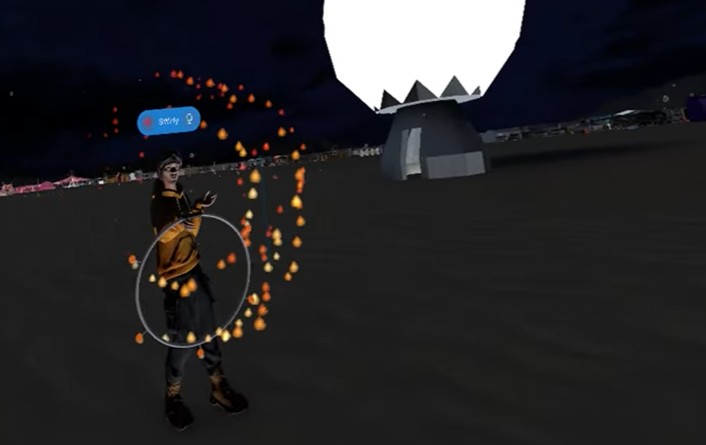
We have a bunch of fun toys, and our admins will be leaving them around BurnerSphere for you to find and play with. Some of them Camp Mates can even keep in their backpack. Everyone nearby sees and hears them. Play a toy with the trigger on your Quest controller or the E key on a computer. Here is what you might find:
- Flow: fire and LED poi, hoops, dragon staffs and meteors, fire fans, a buugeng, a levitation wand, and an LED whip.
- Sound: a djembe, a handpan, a gong, a singing bowl, a maraca, a tambourine, and wind chimes.
- Light and fire: a sparkler, a light painter, a glow totem, an LED kite, an LED parasol, and a poofer with a big red button.
- Bubbles and games: a bubble gun, a heart gun, a giant bubble wand, a bubble machine, a playa mister, a glow beach ball, glow juggling balls, and a flying disc.
- Gifts: a gift pouch that pins a trinket on a friend’s chest for 90 seconds, and a treat tray to share.
Emoji reactions
Pick from six emoji, and yours pops up over your head for everyone around you. On Quest, press the left stick in and tilt toward one. On desktop, hold V and point. To make room, sit and stand moved from that stick click to Quick Settings.
The Orb Garden and the ball pit
These two are for Camp Mates. In the Temple Guardian hub, glowing orbs float in the air. Push one and it drifts off singing a note, then bumps its neighbors, which chime. Over in the Neighborhood world, Flight to Mars now has a ball pit full of balls to jump into and throw around, and everyone sees the throws.
New for events
Three additions make it easier to run a gathering. The Ethereal Temple event space is open to Camp Mates. New to hosting? Start with our guide to hosting your own event.
The Intention Pond
In the Ethereal Temple, a pond ringed with rocks and flowers waits for you. Pick a flower, speak your intention out loud, and give it to the water, where it floats for as long as the room is up. Nothing is typed or recorded. It works on Quest too. We designed it for Caitlin Krause’s Immersive X workshop, Designing the Future Within: Wonder, Agency, and Human Connection in Immersive Worlds. The Ethereal Temple is available for others to host their events in by request: email events (at) burnersphere (dot) com.
Sound bath
Thirty-four instruments that everyone can play live: singing bowls, gongs and bells, chimes, nature sounds, and drones, with mats and cushions to settle into. We also designed the sound bath for Caitlin’s workshop, and it is in the Ethereal Temple right now, so come give it a try. Our admins set up sound baths, and Camp Mates can request one in their own worlds by emailing events (at) burnersphere (dot) com.
Events Kiosk upgrades
Camp Mates can now run an event in a world they don’t own. Hosts can name co-hosts and add speakers straight from the list of people in the world. You can also save your setup: place your Breakout Zones, whiteboards, and Speaker Stages, save the layout, and bring it all back the next time you return to that world.
Hide name tags
Everyone can now turn off name tags with a new switch in Settings. It is helpful when you are filming in BurnerSphere and don’t want names blocking the view or showing up on camera. It only changes your own view, not anyone else’s.
Why we built it
“Burning Man has always been a party you help make,” Doug says. “With v80, you can spin fire poi, bang a gong, or bonk a friend in the Thunderdome, and everyone around you is right there with you.”
Bug Fixes You’ll Notice
- Joining a world tries again by itself when the server is slow to answer, instead of showing an error.
- Center Camp and Gate World load entirely from the app, with nothing to download first.
- Floor toys: click one (or point at it and pull the trigger) to play it instead of picking it up.
- The bell no longer rings over and over when something rests against it.
- Portal glows fade softly on Quest again, instead of showing as solid discs.
- Pride World water shows properly on PC again. In v79 it drew pink.
- Your own shadow has its head back on desktop. Before, it showed only a neck.
- Bubbles pop with a sound when you hit them with your hands. Before, they vanished silently.
- Light orbs in Toolkit worlds no longer show the helper shapes builders use to find them.
- Coloring Book World: the paint station’s sign now says “Click for a palette” (in VR, “Point here for a palette”), so it reads as a button.
Every new feature in v80 has been tested, but if you run into a bug, please report it on the BurnerSphere Discord.
Frequently Asked Questions
Where do I find the new toys?
Our admins will be leaving toys around BurnerSphere for you to play with. Some of them Camp Mates can keep in their backpack. Play one with the trigger on your Quest controller or the E key on a computer.
How do I send an emoji reaction?
On Quest, press the left stick in and tilt toward an emoji. On desktop, hold V and point. Your emoji pops up over your head for everyone nearby.
Where is the Intention Pond?
In the Ethereal Temple, along with a sound bath. Camp Mates can visit anytime, and anyone who wants to host an event there can request it by emailing events (at) burnersphere (dot) com.
Can I have a sound bath in my world?
Yes. Sound baths are set up by our admins, and Camp Mates can request one in their worlds by emailing events (at) burnersphere (dot) com. To try one now, visit the Ethereal Temple.
Can I save my event setup?
Yes. Place your Breakout Zones, whiteboards, and Speaker Stages with the Events Kiosk, save the layout, and bring it all back the next time you return to that world.
How do I hide name tags?
Turn on the new switch in Settings. It hides the names above people’s heads in your own view only, which is helpful when filming.
Come out and play
Grab a foam bat, find a toy, and bring your friends. Create your free account, download BurnerSphere for your device, and learn about Camp Mate membership when you are ready to dive deeper. Come take a stroll in the digital dust.